Powerful Cordless Air Duster for PCs, Keyboards & Cars
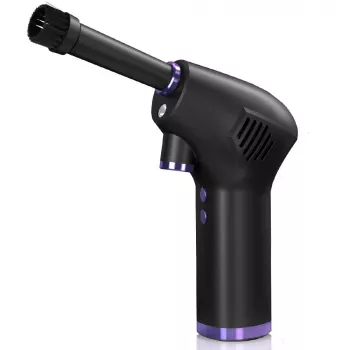
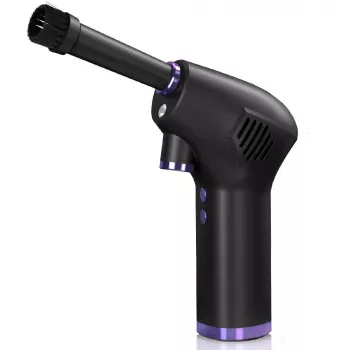
Powerful Cordless Air Duster: Fast, Mess-Free Cleaning for Electronics and More
A cordless air duster delivers a concentrated stream of air to lift dust and debris from tight spaces—without disposable aerosol cans or a bulky compressor. It’s a practical tool for cleaning keyboards, PC fans and vents, camera gear, car interiors, workshop tools, and hard-to-reach corners while staying portable and rechargeable. If regular dusting feels like it never quite reaches the places that matter, a handheld duster can turn “good enough” cleanups into quick, satisfying resets.
What a Cordless Air Duster Is (and What It Isn’t)
A cordless air duster is built to push debris out of places fingers, cloths, and standard vacuums struggle to reach. Think of it as controlled airflow on demand—strong enough to dislodge dust, but manageable enough for day-to-day use around delicate gear.
- Designed to blow dust out of crevices: vents, grills, key switches, filter housings, seams, and small mechanical parts.
- Not a vacuum: it moves debris away from a surface, so pairing with a microfiber cloth or keeping a vacuum nearby helps prevent dust from resettling.
- Not a replacement for high-pressure shop air: it isn’t meant for heavy industrial blow-off tasks; it’s optimized for controlled cleaning around electronics and household items.
- Technique matters: short bursts, the right distance, and directing dust outward (not deeper into devices) typically produces the cleanest results.
Everyday Places It Helps
Once you have a cordless duster on hand, it tends to become the “first step” before wiping, brushing, or vacuuming—because it clears the stubborn stuff from corners and edges quickly.
- Computers and gaming consoles: clear dust from intake/exhaust vents, heatsinks, and fan grills (hold fan blades still to prevent overspin).
- Keyboards and desk setups: dislodge crumbs and fine dust between keys, around switches, and in desk cable channels.
- Car interiors: blow grit from seat rails, dashboard seams, vents, cupholders, and door pockets before wiping.
- Appliances and home projects: clean refrigerator coils (where accessible), dehumidifier and air purifier pre-filters, and DIY toolboxes.
- Photography and hobby gear: remove dust from cases, exterior seams, and workbenches (avoid blasting directly into sensors or open optics).
| Task | Best technique | Extra tip |
|---|---|---|
| Keyboard cleaning | Angle airflow across keys, then out | Follow with a microfiber wipe to pick up settled dust |
| PC vents/fans | Short bursts from a few inches away | Hold fan blades to reduce overspin and wear |
| Car vents and seams | Use a narrow nozzle, sweep side-to-side | Brush + air works well for sticky dust |
| Toolbox and small parts | Blow debris toward an empty area | Wear eye protection when clearing metal shavings |
| Filters (pre-filter screens) | Blow from the clean side outward if possible | Avoid high pressure that can deform delicate mesh |
What Makes One Feel “Powerful” in Real Use
Power isn’t just about a loud motor—it’s about how efficiently the airflow removes dust without forcing you to repeat the same passes over and over.
- Airflow and motor performance: stronger output clears compacted dust faster and reduces time spent repositioning.
- Nozzle design: a focused tip concentrates air for crevices; a wider nozzle covers larger surfaces with fewer “snowplow” blowbacks.
- Consistent output: solid performance stays usable through a full cleaning session rather than fading quickly as the battery drops.
- Ergonomics: a comfortable grip and balanced weight matter during longer sessions like PC builds or car detailing.
- Noise and control: multiple speed modes help match airflow to delicate tasks, keeping control without overblasting.
For a ready-to-go option, the Powerful Cordless Air Duster is a simple way to replace disposable cans while keeping cleanup fast and portable.
Rechargeable Convenience: Battery, Charging, and Runtime Habits
A rechargeable duster is easiest to live with when it matches how you actually clean—quick touch-ups during the week and deeper resets when dust builds up.
- Choose a routine: quick cleanups work best with frequent short sessions; deeper cleanouts benefit from charging beforehand.
- Prefer controlled bursts: short bursts are often more effective than continuous blasting and can extend runtime.
- Charging practicality: consider where you’ll charge it (desk, garage, travel bag) and whether status indicators are easy to read at a glance.
- Storage: keep it dry and avoid leaving it in hot cars or direct sunlight for long periods to preserve battery health.
Safer Cleaning Around Electronics
For broader guidance on safe maintenance steps, iFixit’s device-specific repair and cleaning resources can be helpful: iFixit — Electronics cleaning and maintenance guides.
How It Compares to Disposable Cans and Shop Air
If compressed air is used in workplace settings, it’s also worth noting safety standards for air cleaning practices: OSHA — 29 CFR 1910.242(b) (Compressed air for cleaning).
Maintenance and Simple Habits That Keep Performance Strong
Featured Picks Available Now
- Powerful Cordless Air Duster — A practical option for quick, rechargeable dusting across electronics, cars, and home projects.
- 70cm Kawaii Animal Plush Pillow – Soft Seal, Shark & Narwhal Hugging Toy — A cozy add-on for a home office or gaming setup refresh.
- VVS Moissanite Long Tassel Drop Earrings — A statement accessory pick for gifting.
FAQ
Can a cordless air duster safely clean a PC or laptop?
Yes—power the device off, unplug it, and use short bursts from a small distance away. Hold fan blades still to prevent overspin, and aim airflow so dust exits the case instead of being driven deeper into ports.
Is it better than disposable compressed-air cans?
For frequent cleaning, rechargeable dusters are often more convenient and consistent than cans that cool down and lose pressure. You’ll still get the best results by controlling where the dust goes and wiping or vacuuming afterward.
How do you keep dust from flying everywhere?
Blow dust outward toward an open area and position the item near a trash bin, outdoors, or next to a vacuum intake. After the debris is dislodged, use a microfiber cloth or vacuum to capture what settles.













Leave a comment