Kids Digital Camera Guide: Best Picks by Age & Safe Sharing
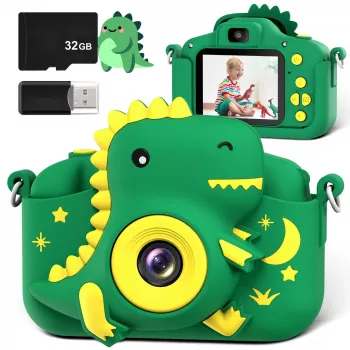
Kids Digital Camera: A Fun, Durable Way to Spark Creativity
A kids digital camera turns everyday moments—park trips, birthdays, pets, and playtime—into a creative activity kids can own from start to finish. The right camera is easy to hold, simple to operate, tough enough for drops, and age-appropriate in features so kids can focus on taking photos rather than fiddling with settings. A small camera also encourages kids to slow down, notice details, and tell stories through pictures—skills that carry over to school projects, journaling, and family memory-keeping.
What Makes a Great Kids Camera
Not all “kid” cameras are built the same. A few practical design choices can make the difference between a toy that gets ignored and a camera that becomes a constant sidekick.
- Comfortable size and grip: Small hands do best with chunky buttons, a non-slip body, and a wrist strap or lanyard that’s easy to use.
- Rugged build: Look for shock resistance, protective silicone cases, and recessed lenses to reduce scratch risk.
- Simple controls: A large shutter button, clear icons, minimal menus, and a quick way to review photos keeps frustration low.
- Kid-friendly screen: A bright display with basic playback tools (delete, favorites) and intuitive navigation helps kids stay independent.
- Storage and transfer: microSD support and a straightforward way to move files to a computer makes printing and sharing easy.
Age-Based Guidance
Kids’ needs shift quickly as their coordination, patience, and creative goals evolve. Matching camera complexity to age keeps photography fun instead of fussy.
- Ages 3–5: Prioritize durability, a very simple interface, and a comfortable strap; keep expectations modest for image quality.
- Ages 6–8: Look for quicker startup, easier gallery browsing, and enough storage for lots of experimentation.
- Ages 9–12: Consider higher resolution, better battery life, and more creative tools (filters, frames) without becoming overly complex.
- For siblings: Choose a model that’s easy to reset, with clear storage management so each child can keep their own photos.
Quick Fit Guide for Different Ages
| Age range | Priorities | Nice extras |
|---|---|---|
| 3–5 | Drop protection, big buttons, strap | Simple stickers/frames, limited settings |
| 6–8 | Easy menus, fast playback, microSD support | Basic games (optional), selfie camera |
| 9–12 | Better image quality, longer battery, file transfer | Light editing, video recording, effects |
Features That Matter Day to Day
Spec sheets are helpful, but daily use is where a kids camera proves itself. The most loved cameras are the ones that “just work” during real life—car rides, field trips, and spur-of-the-moment backyard adventures.
- Battery life: Aim for enough power to last a day out; USB charging is usually simplest for families.
- Photo and video: Photos are the main draw, but short videos can be great for school projects and travel memories.
- Front/selfie lens: Encourages kids to capture group shots and creative self-portraits without needing help.
- Built-in effects: Frames and filters can keep kids engaged; moderation is key so the camera stays easy to use.
- Sound and prompts: Optional shutter sounds and simple on-screen prompts can help younger kids feel confident.
Safety, Privacy, and Parent-Friendly Habits
A camera is a great way to practice digital responsibility without handing over a phone. Keeping sharing controlled and expectations clear helps kids enjoy photography while protecting their privacy.
- Keep sharing controlled: Transfer photos to a parent device before posting; avoid cameras or apps that require public accounts for basic use.
- Talk about boundaries: No photos of other kids without permission, no capturing private spaces (bathrooms, changing rooms), and no personal info in images.
- Use printing as a screen-light alternative: Create a small photo wall, scrapbook pages, or a “photo of the week” board.
- Set simple rules: Where the camera is allowed, when it’s put away, and how it’s charged and stored.
For additional guidance on family tech habits, the American Academy of Pediatrics’ Family Media Plan is a practical framework. For online privacy rules involving kids, review the FTC’s COPPA information.
Creative Photo Challenges Kids Actually Enjoy
When kids get stuck taking the same shot over and over, mini “missions” keep things fresh and build real photography instincts like framing, sequencing, and noticing light.
Spotlight: Kids Digital Camera
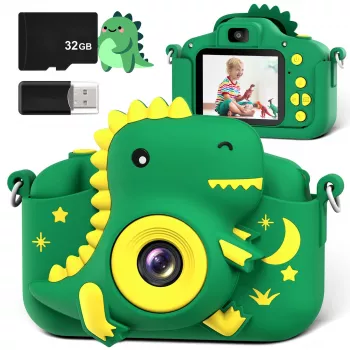
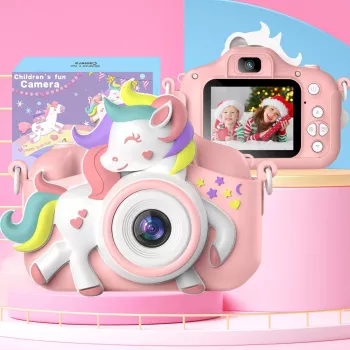
If you’re looking for a straightforward first camera, the Kids Digital Camera is a playful entry point for kids to learn the basics of framing, timing, and storytelling through images. Designed to be simple to pick up and use, it supports independent fun during trips, playdates, and everyday adventures. It also makes a budget-friendly gift option that can be paired with a small memory card and a photo-printing routine for ongoing enjoyment.
For gifting moments, consider building a “cozy memory bundle” with a comforting add-on like the 70cm Kawaii Animal Plush Pillow – Soft Seal, Shark & Narwhal Hugging Toy. And for families shopping for a different occasion, the Newborn Baby Gift Set – Bath Toys, Towels, Rattles & More is an easy, practical present to keep on hand for baby showers and welcome-home visits.
Setup Checklist for a Smooth First Day
FAQ
What age is a kids digital camera best for?
Most kids enjoy them from preschool through early middle school. Choose simpler, more rugged options for ages 3–5, and lean toward better image quality and battery life for ages 9–12.
Do kids cameras need a memory card?
Some cameras include internal storage, but a memory card usually makes it easier to save lots of photos and move them to a computer. Check the supported card type and maximum capacity before buying.
How can photos be shared safely?
Transfer photos to a parent-controlled device first and avoid public sharing by default. Teach kids to ask permission before photographing others and to keep personal details out of pictures.














Leave a comment