Dial In a Mesh Office Chair: Lumbar, Headrest & 2D Arms
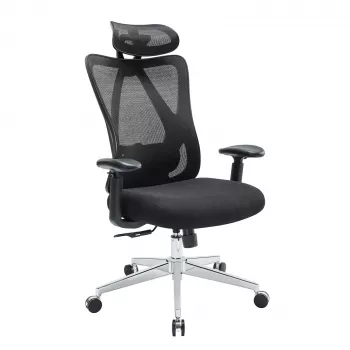
Ergonomic Mesh Office Chair with Lumbar Support, Adjustable Headrest & 2D Arms
A breathable mesh chair can make long desk sessions feel lighter—especially when the back, neck, and arm supports adjust to match the body instead of forcing a fixed posture. This guide breaks down what matters in an ergonomic mesh office chair with lumbar support, an adjustable headrest, and 2D armrests, plus how to set it up for steady, all-day comfort.
What makes this chair feel supportive day to day
Comfort isn’t just “soft vs. firm.” The best everyday support comes from a chair that helps you stay neutral while still letting you shift positions throughout the day.
- Mesh back promotes airflow, helping reduce heat buildup during long work blocks.
- Lumbar support encourages a neutral lower-back curve so the pelvis doesn’t roll back into a slouch.
- Adjustable headrest reduces neck fatigue by supporting the head when sitting tall or reclining slightly.
- 2D armrests enable small positioning changes to keep shoulders relaxed and wrists aligned during different tasks.
- Setup matters as much as features: seat height, arm height, and screen position determine whether the chair “fits” or fights you.
For broader workstation guidance, ergonomics resources from OSHA and the Mayo Clinic align on the same fundamentals: neutral posture, supported joints, and frequent micro-movements beat “perfect posture” held rigidly.
Adjustments at a glance
Adjustability is most useful when it matches what you do most—typing, calls, reading, or occasional recline breaks. Even small changes (around 1–2 cm) can noticeably reduce shoulder tension or low-back pressure. Plan to re-check your settings after a few days; the “right” fit often takes a short break-in period.
Common adjustments and why they matter
| Adjustment | What to look for | Comfort benefit |
|---|---|---|
| Lumbar support | Sits in the small of the back without pushing too hard | Helps maintain a neutral spine and reduces slumping |
| Headrest | Height/angle that supports the base of the skull, not the upper neck | Can ease neck strain during upright sitting or light recline |
| 2D armrests | Height + forward/back (or similar) movement for forearm support | Reduces shoulder hiking and wrist pressure while typing |
| Seat height | Feet rest flat with knees near 90° | Improves circulation and reduces pressure under thighs |
| Tilt/recline | Stable tilt with a comfortable stop point | Encourages movement and reduces static posture fatigue |
How to dial in lumbar support and headrest position
The most common reason an ergonomic chair feels “off” is an adjustment order that skips the basics. Use a simple sequence, then fine-tune.
- Start with seat height: feet flat, knees roughly level with hips (or slightly lower). If the desk height forces you higher, consider a footrest so your legs stay supported.
- Set lumbar second: bring the lumbar support into the natural curve of your lower back. It should feel present, not aggressive.
- Watch for overcorrection: if lumbar pressure forces your torso forward or creates a sharp point, back off intensity (or reposition it if your chair allows).
- Set the headrest for “tall sitting”: it should support the head without pushing your chin down. Good headrest contact typically happens at the base of the skull, not mid-neck.
- Adjust one variable at a time: if discomfort shows up after 30–60 minutes, change arm height first, then lumbar, then tilt. This helps isolate the real culprit.
For additional chair adjustment references, Cornell’s ergonomics materials are a solid, practical resource: Cornell University Ergonomics.
Setting 2D armrests for typing, mousing, and calls
Armrests can be a relief or a nuisance depending on where they place your shoulders and wrists. A quick check: when your forearms rest on the pads, your shoulders should stay down and your elbows should remain close to your sides.
- For typing: aim for forearms roughly parallel to the floor and wrists neutral (not bent upward). If you feel your shoulders creeping up, the armrests are too high.
- For mousing: comfort can differ between keyboard and mouse tasks. If the mouse-side armrest forces your wrist outward, try lowering that side slightly or sliding the pad to a position that supports the forearm without pushing the hand.
- For calls/reading: a small raise in armrest height can reduce upper-back fatigue, as long as it doesn’t elevate your shoulders.
- If the desk is too high: lowering the chair to match can cause feet to dangle. Use a footrest so your legs stay grounded while your arms stay supported.
Mesh comfort, durability, and care
Mesh is popular for a reason: it’s breathable, responsive, and often better at spreading pressure than a stiff upholstered back. To keep that comfort consistent, focus on long-term support and a little maintenance.
Who this chair tends to suit best
In-stock picks to consider
- Ergonomic Mesh Office Chair with Lumbar Support, Adjustable Headrest & 2D Arms
- 70cm Kawaii Animal Plush Pillow – Soft Seal, Shark & Narwhal Hugging Toy
- VVS Moissanite Long Tassel Drop Earrings
FAQ
How should lumbar support feel when it’s adjusted correctly?
It should fill the natural curve of the lower back and encourage an upright posture without pushing your torso forward or creating sharp pressure. If it feels intrusive, reduce intensity or reposition it, then re-check seat height and depth so your hips aren’t being tipped out of alignment.
Do 2D armrests help with shoulder and wrist discomfort?
They can, as long as they’re set to support your forearms with relaxed shoulders and neutral wrists. The main goal is avoiding shoulder shrugging and keeping elbows comfortably close to your body while you type and use the mouse.
Is a headrest necessary for an office chair?
Not for everyone, but it can reduce neck fatigue during recline breaks or long sitting sessions. The best headrest position supports the head without pushing the chin down or encouraging forward head posture while typing.













Leave a comment